Six Practical Security and Governance Steps for Adopting Claude Cowork
How to adopt Cowork quicker using built-in configurations alongside contextual visibility and controls

Introduction
Claude Cowork is being adopted quickly, bringing AI agents that work autonomously to non-technical teams. Because it reaches across their files and data to get everyday work done, it sits high on security teams’ lists, and they are looking for a way to safely enable that adoption.
This guide walks through the configurations built specifically for Cowork, then the contextual governance you need beyond hardening, so you have a clear path to adopting it. It also covers what to account for when you adopt Cowork alongside the many other agents your teams already use.
Why Cowork is top of mind for security teams
Autonomy in the hands of many users is what makes Cowork a subject of uncertainty. An executive connects email and calendar and has Cowork triage the inbox, draft replies, schedule meetings, and summarize threads. A finance team points it at connected data sources, has it crunch the numbers, and produces a formatted Excel model, a slide deck, or a written summary each quarter on the analyst’s desktop.
In both cases the agent acts on its own and works with sensitive data. But every agent carries that risk, and Cowork is not the only agent your non-technical teams use, so you have to both govern Cowork specifically as well as do this alongside the other agents already in play.
This guide starts with the particularities of Cowork itself, and then widens to the perspective that applies to your other agents.
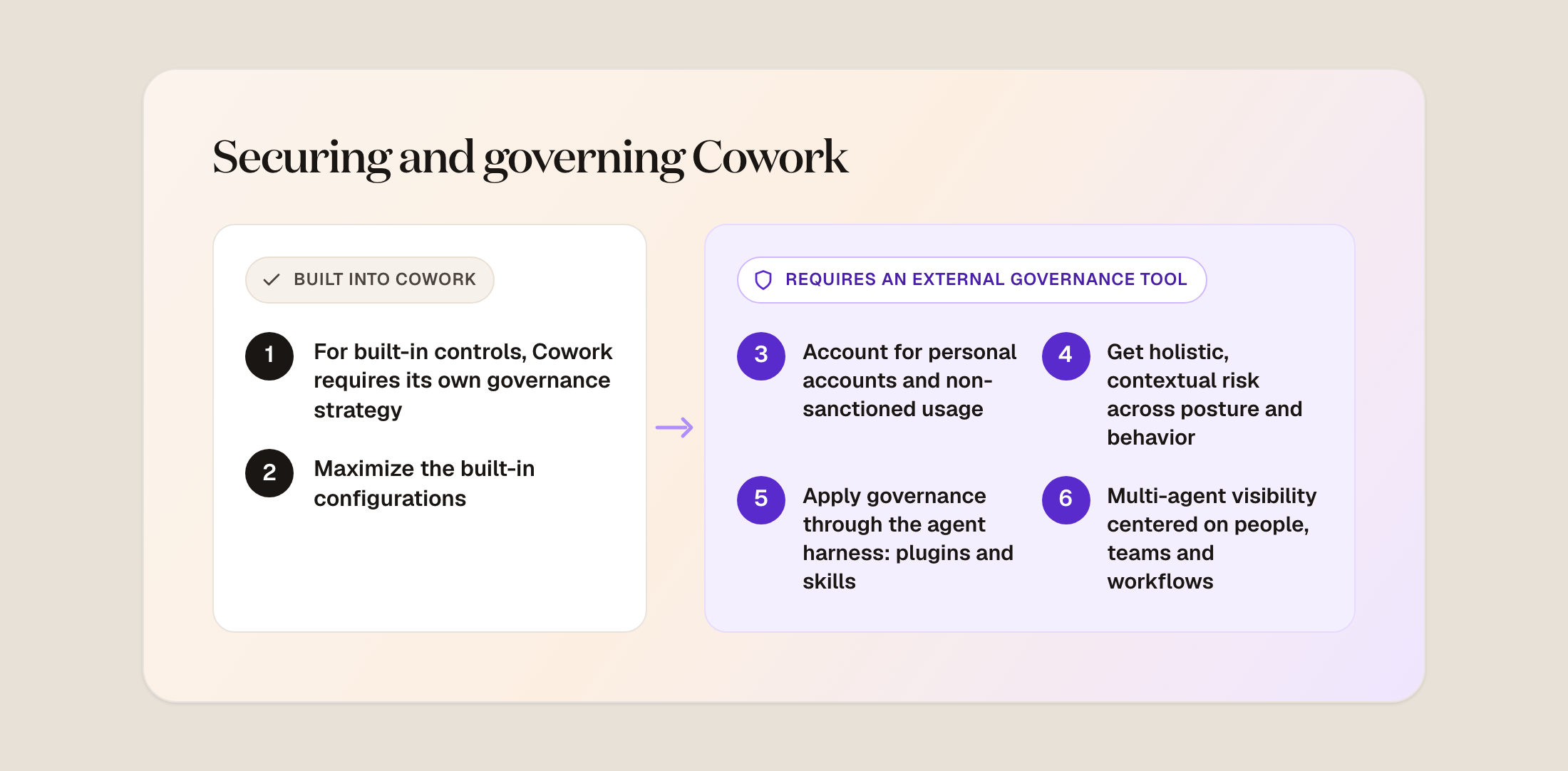
1. Treat Cowork as its own surface area to configure
Architecture
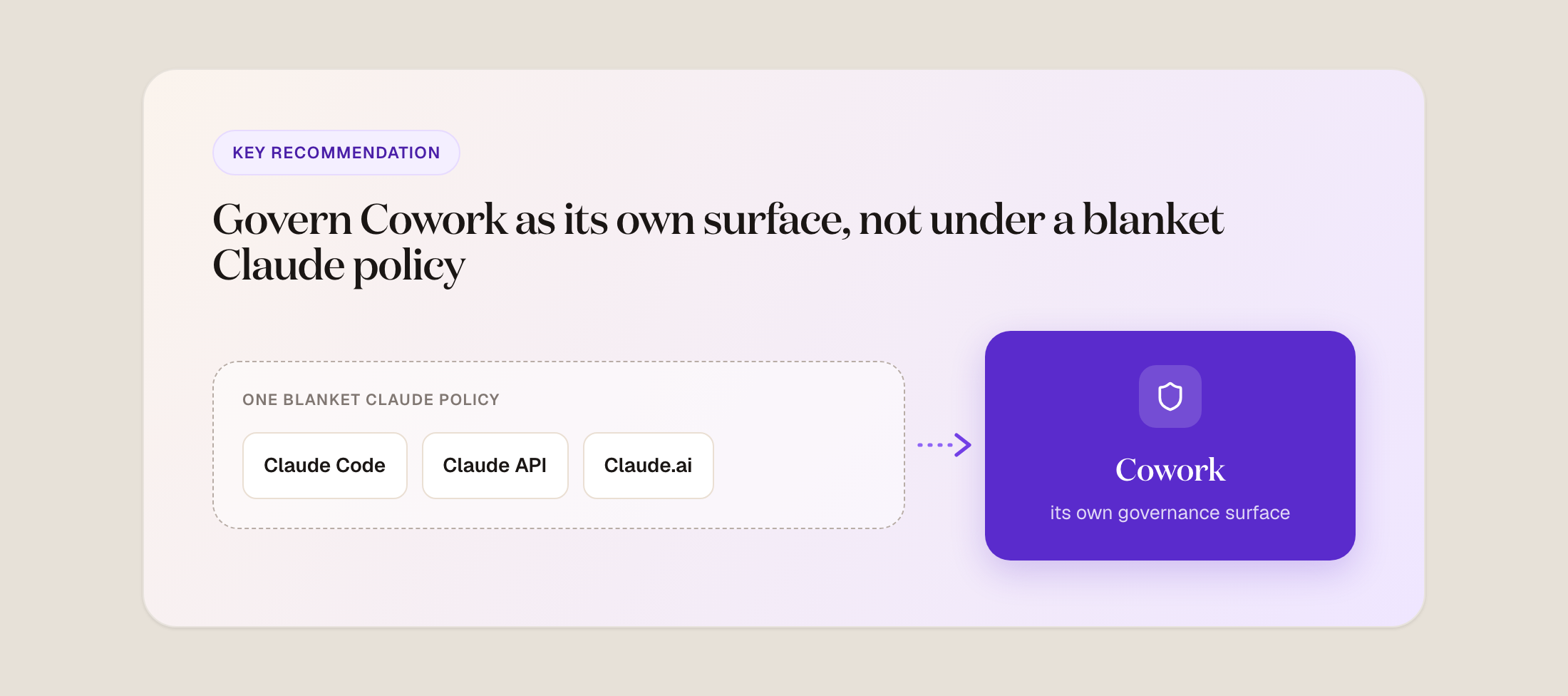
It does not make sense to govern Cowork with the same blanket policy you use for another Claude product - or any other agent. For example, in reference to Claude Code, while both run locally, Cowork keeps code execution inside a virtual machine, because its work does not need host access. Claude Code, on the other hand, runs directly on the host.
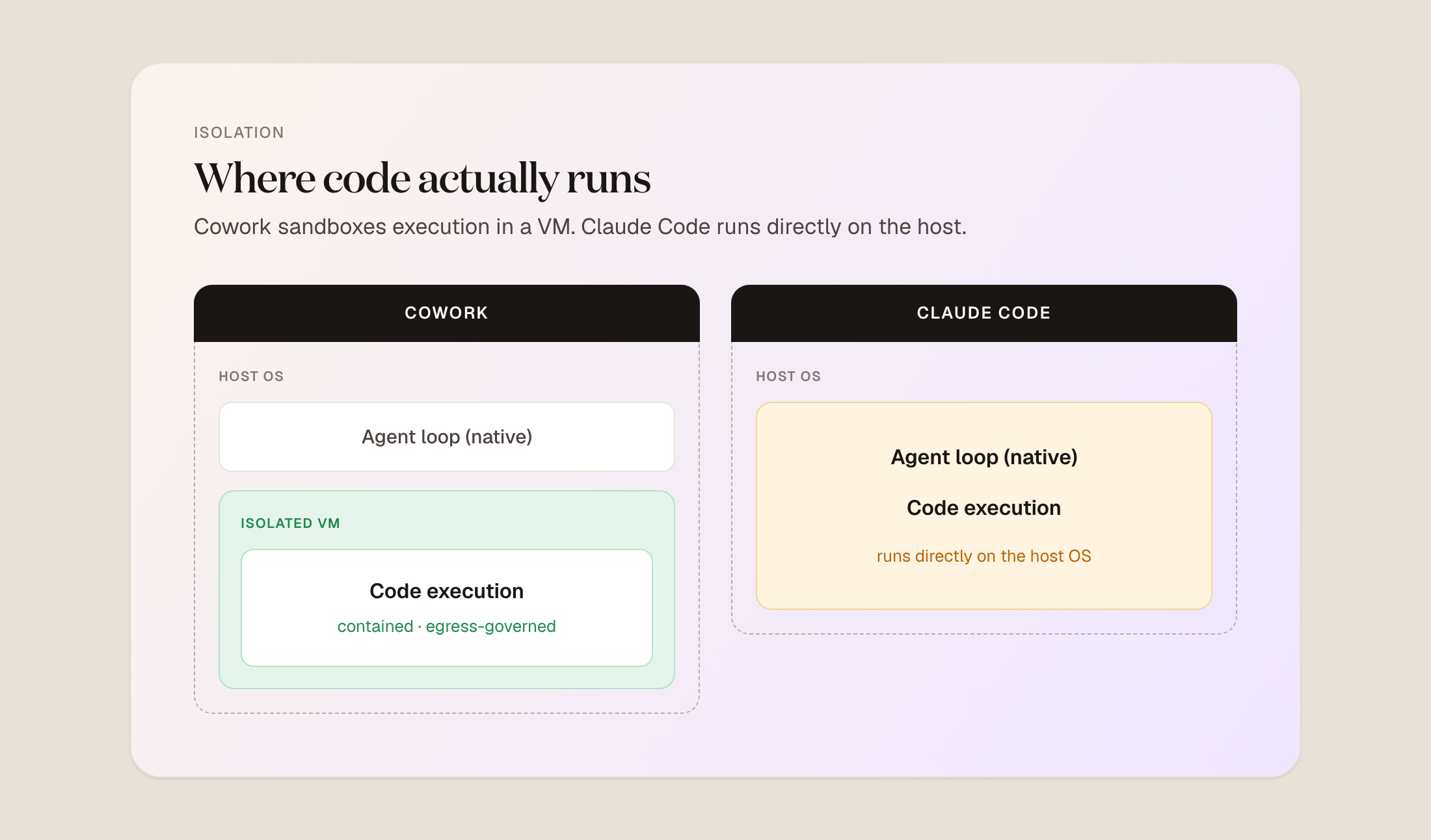
The governance surface differs too. Claude Code offers lifecycle hooks and managed settings and is covered by the Compliance API today, while Cowork does not expose the same lifecycle hooks and is not yet in the Compliance API, though coverage is on the roadmap.
Users
The MCPs, tools, and extensions worth exposing to Cowork are for a less technical team than, say, Claude Code, so the Cowork tool scoping and access should reflect that.
2. Maximize the built-in configurations
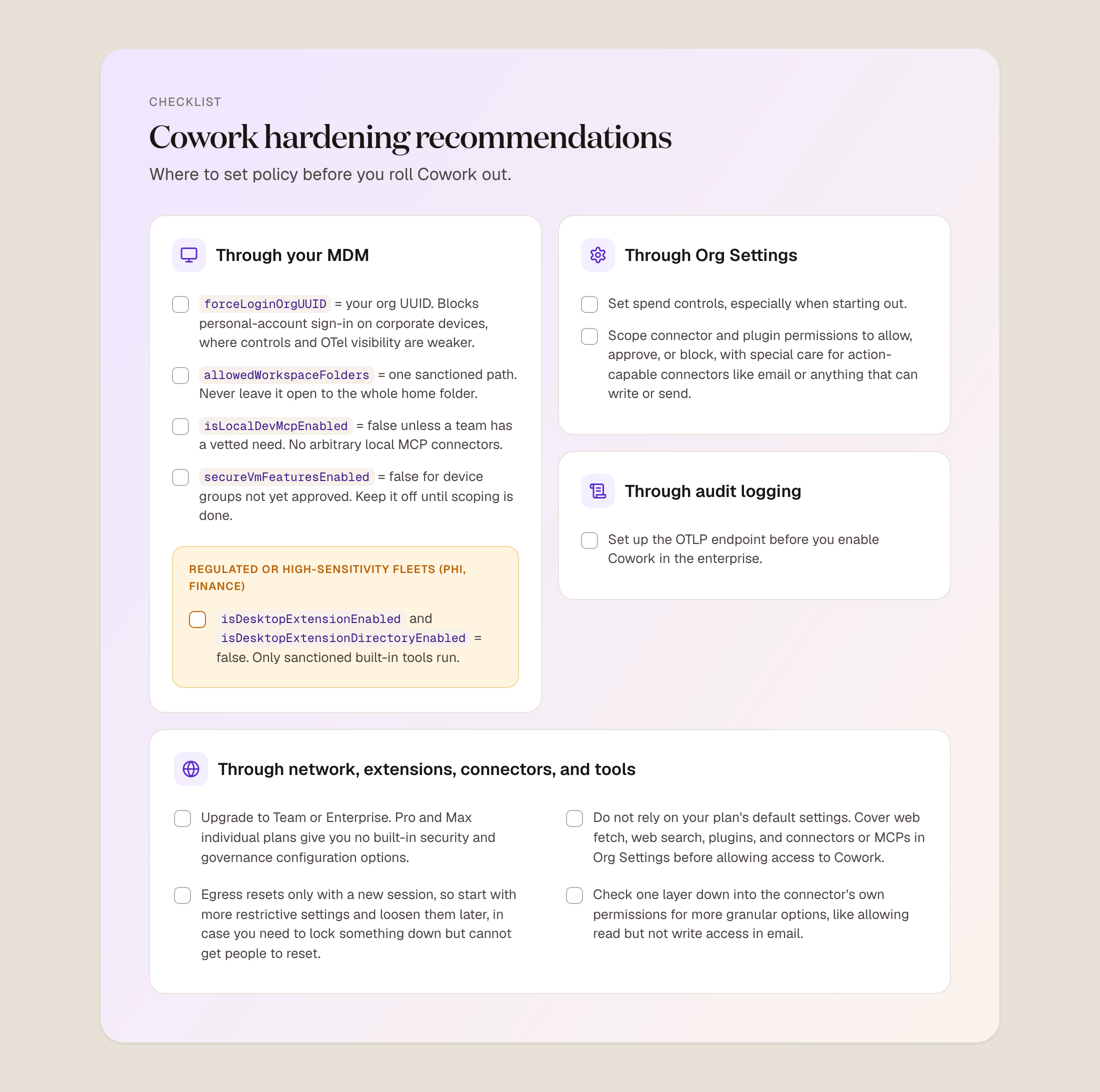
Only Team and Enterprise plans provide the configurations required to to secure and govern Cowork. Individual Pro and Max accounts can run Cowork, but they carry none of the MDM keys, org capabilities, OpenTelemetry (OTel), or RBAC you need.
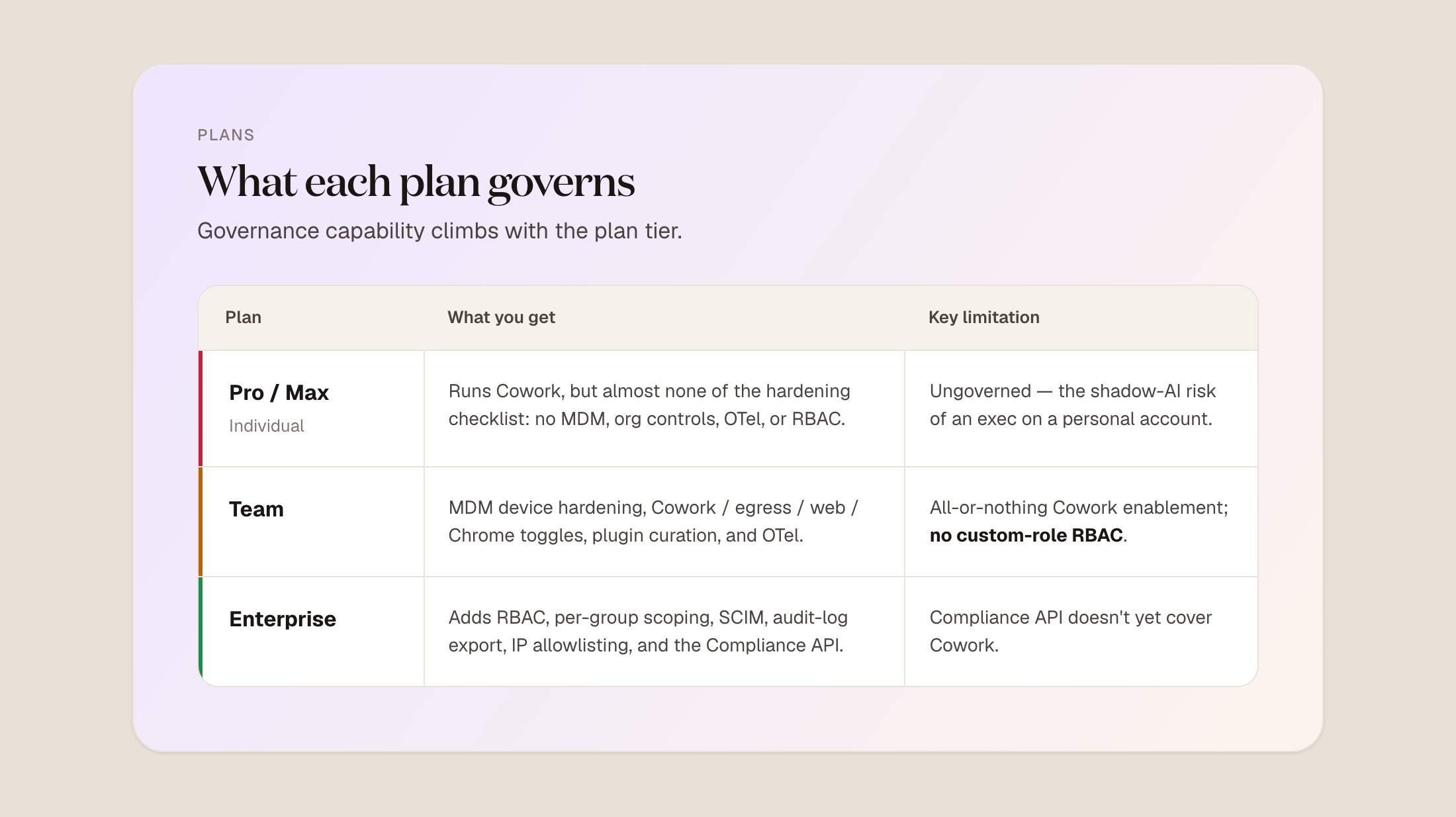
If people in your organization already use Cowork, and in most organizations some do, that means they are using it completely ungoverned. Buying the governed version is what lets you begin to apply controls. Once you have them, there is a lot you can harden.
Managed configuration
Managed configuration, delivered through an MDM, controls a broad set of Cowork’s connections on managed devices. A bank can use its MDM to stop Cowork from connecting to arbitrary local MCP connectors. A hospital handling PHI can go further and block all desktop extensions on clinician devices, so only sanctioned built-in tools run.
The MDM is not where you manage org-wide enablement, plugin catalog policy, or conversation-history governance, which live in Organization settings and the plugin marketplace. If you would rather curate extensions than ban them, leave the keys enabled and use the allowlist in Org Settings, because the MDM setting overrides the in-app allowlist.
Org Settings
Spend controls cap how many tokens users consume over a period, which keeps costs predictable. RBAC lets you manage custom roles that grant permission over connectors and plugins and apply granular controls, including the network egress allowlist.
Audit logging
Cowork is not covered by the Compliance API today, so to capture its activity you configure an OpenTelemetry (OTLP) endpoint and stream events into the tools you already use. OTel gives you behavior: prompts, tool calls, file access, and approval decisions. When Compliance API coverage lands, it will also enumerate orgs, users, roles, groups, and effective settings, so you can run access reviews, data-subject requests, and investigations.
Network connections, extensions, connectors, and tools
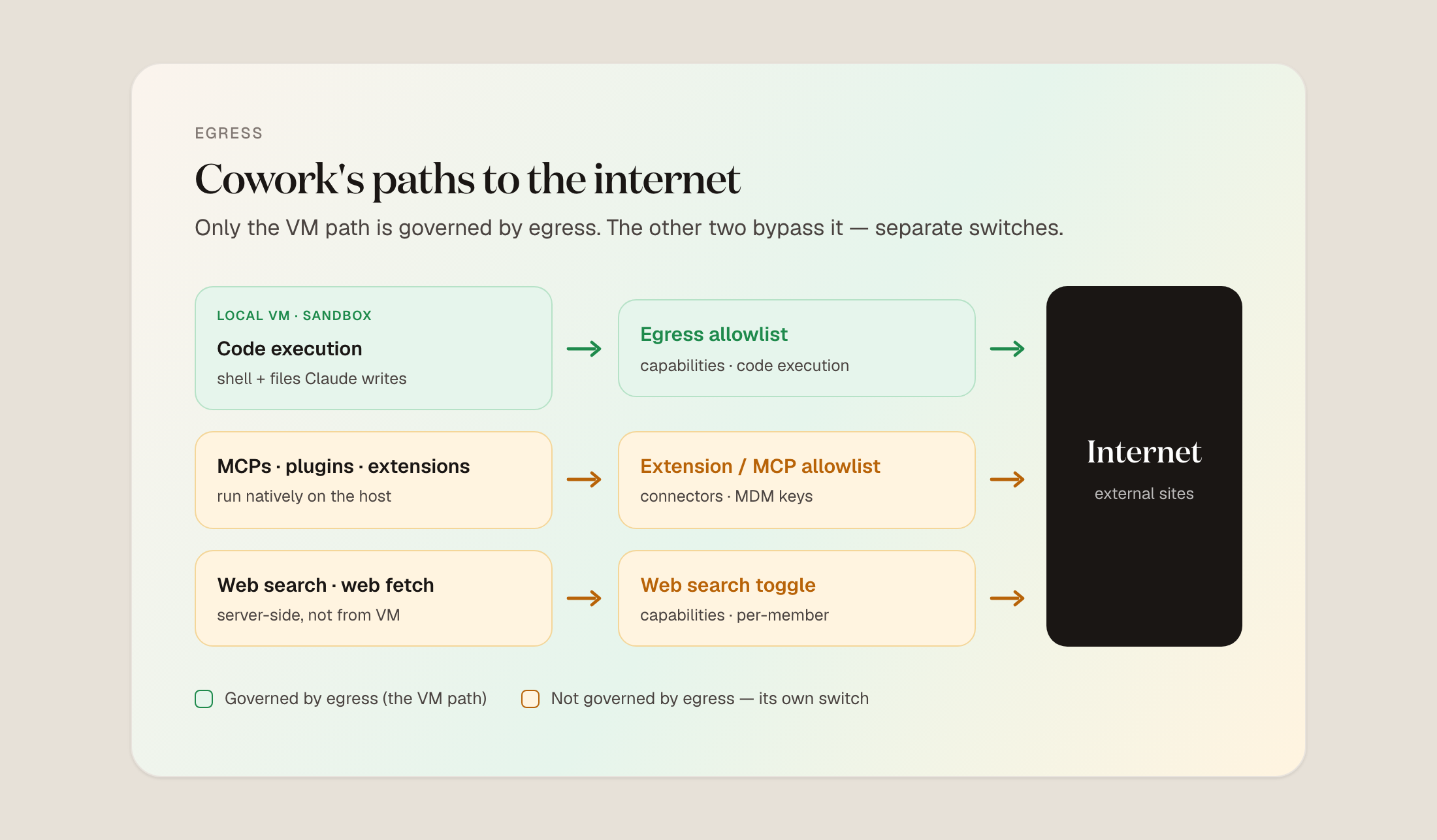
Treat network access holistically, across the egress setting, the web tools, and connectors. Egress governs package installs and the capabilities that depend on them. Blocking the egress entirely means that the agent will lose the ability to install anything new, for example a PDF library or charting library.
If you don’t block entirely, you can allow all or set a list of approved package managers and specific domains.
If you allow a few package managers, you can pair it with a curated plugin marketplace and tool allowlist.
Critically, defaults differ by plan: new Enterprise organizations start with egress off, and Team starts on, limited to package managers. Changes take effect only at the start of a new session, so confirm the live setting in your console rather than trusting the default.
Egress does not close the other paths. Web fetch, web search, connectors, MCPs, and extensions across Chrome, Microsoft 365, etc. are governed in Organization settings.
One key tip is to go a level deeper into the permissions of each connector, which you can set. For example, if you want users to draft and review emails but not send them automatically, the Gmail connector lets you require approval for any write action.
3. Account for personal accounts and non-sanctioned usage
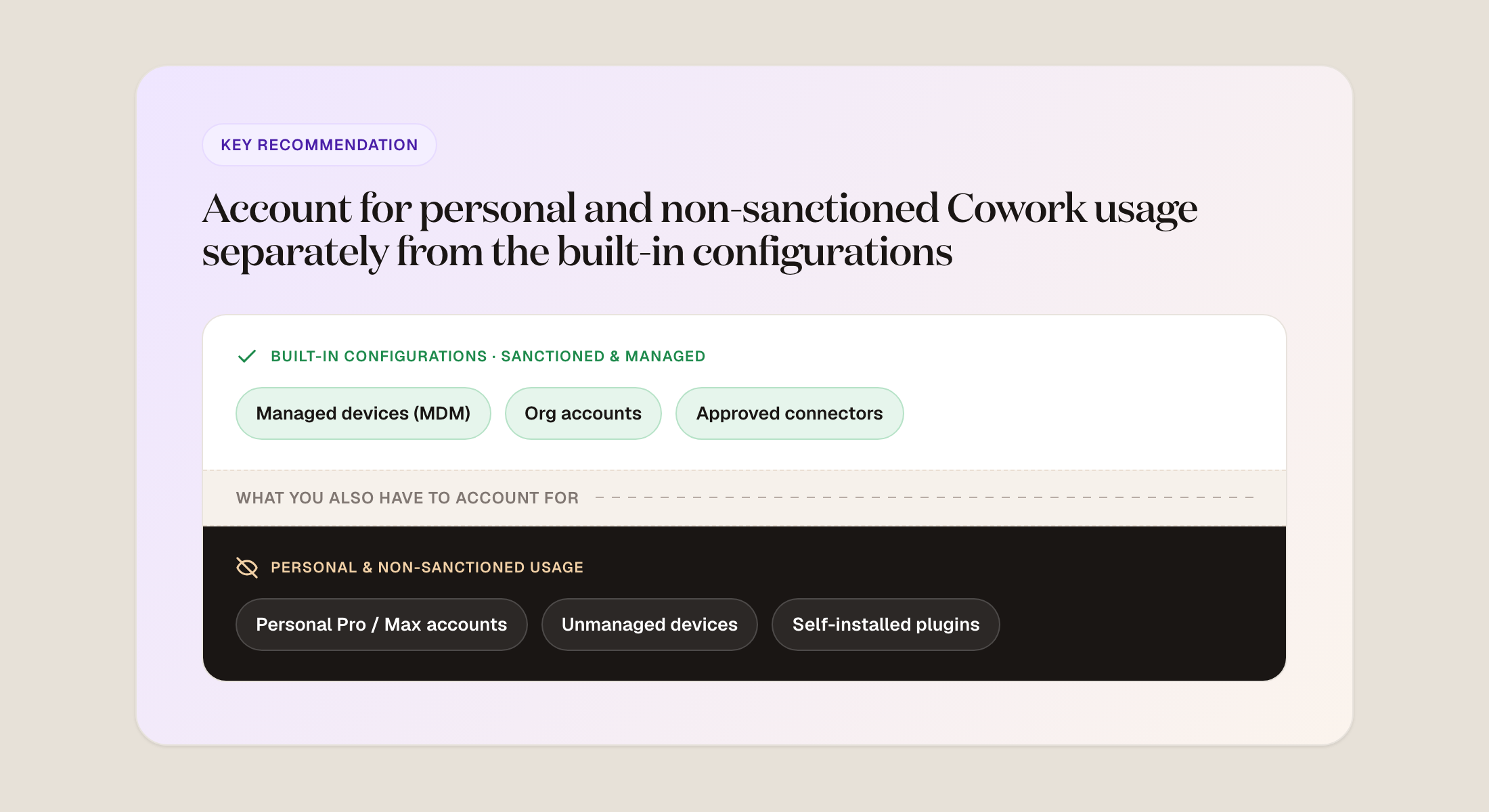
Personal Cowork accounts carry none of the controls, so if your people already run them, you need that visibility from another source.
An MDM can block personal use of Cowork on company laptops, but it does nothing about usage that predates the block, and while you are still deciding whether to buy enterprise Cowork and suspect people already use it, a hard block is too blunt.
Seeing which personal accounts are in use, and understanding the real exposure, makes it far easier to set, enforce, and explain policy with your users. The same holds for any non-sanctioned account, such as someone signing in with their work email but outside your Enterprise plan, which will also not be covered with OTel if they are using a Pro account.
This is where a tool like Geordie first comes into play.
4. Get holistic, contextual risk across posture and behavior
After testing Cowork, one of Geordie’s customers said: “It’s a little insane what it can do or not do. I had it trying to install a bunch of command line tools into its sandbox. And when that was failing, it tried to get me to install the tools for it from somewhere else. So it could run commands and it didn’t seem to have a problem with what I was asking it to do.”
What they were experiencing was Cowork improvising on its own, with no one pushing it. But you also have to account for the risks where something outside is doing the steering: a prompt injection hidden in the content the agent reads, or a tool it trusts that has been compromised, and the key to managing across all of these issues is context.
Prompt injection and tool poisoning
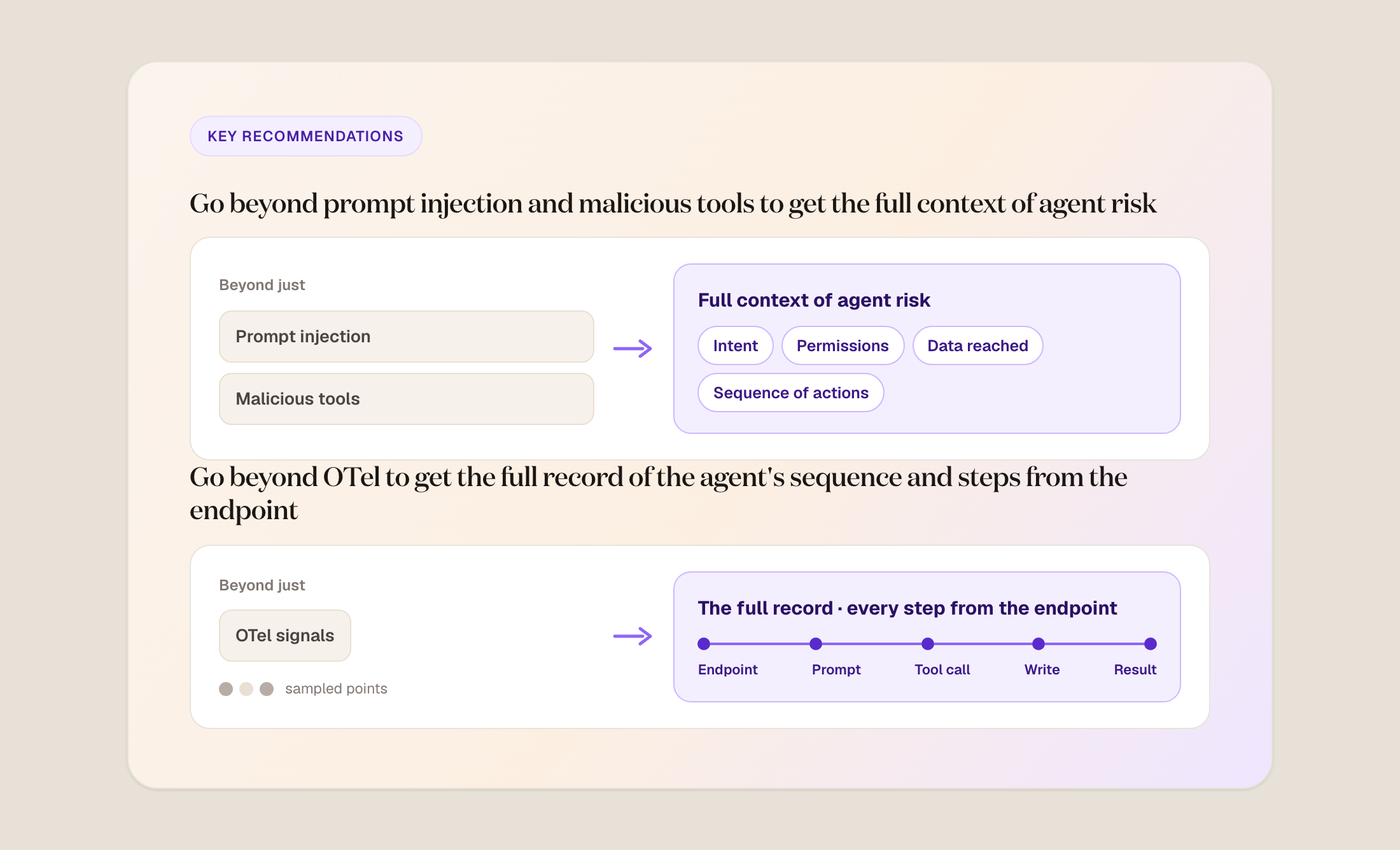
Prompt injection is the common call-out, and a fair one. Configuration can limit the consequences of an injection, but it will not prevent the injection or catch it in the moment. You could turn off web search, web fetch, and Chrome to configure it away, but using Cowork without allowing it to even search the web is not very useful.
Tool poisoning is another kind of external threat that is hard to lock down with configurations, without rendering Cowork useless. You can set allowlists for plugins, MCPs, and connectors that control which tools Cowork can use across your estate, but that won’t show whether an approved tool has been compromised. Meanwhile OTel shows prompts, tool calls, and file access but not what a tool returns, or the full conversation. Configuration and hardening alone leave compromised-tool risk on the table.
Prompt injection and tool poisoning also cannot be treated in isolation, because the prompt and the tools are only part of a larger decision process that includes context retrieval, tool interaction, and multi-step reasoning. Over-weighting prompt quality or input filtering leaves an incomplete picture of how the agent behaves. An injection matters most when external input is folded into the agent’s reasoning and carried across steps, shaping which tools it selects, how it reads data, and what it prioritizes. That influence is not a single event. It builds as the agent works through a task, and the same holds for tool poisoning and external dependencies.
OTel has a limit here too: with Cowork, the full record of what the agent read, reasoned, and produced lives only on the endpoint, so investigating means collecting from the device, and if the machine is wiped or lost, or the user clears the history, no authoritative copy may remain.
Agents decide in context and over time. They select tools, interpret inputs, and carry information from one step to the next toward a goal, so the question becomes how a sequence of actions produced a result. That means understanding the following, through a mechanism other than just OTel:
- how agents choose and chain tools
- how context is introduced, transformed, and reused
- how decisions evolve across a workflow
- where behavior diverges from expected patterns
The injections and compromised tools that surface inside these sequences belong in one view of risk rather than a list of separate worries.
5. Apply governance through the agent harness: plugins and skills
Depending only on out-of-the-box configurations is too rigid for practical adoption. Take the lethal trifecta, where untrusted content carries a hidden instruction that tells the agent to take private data it can read and send it out. Configuration alone can break it in three ways:
- Close the exfiltration leg. Disable egress, web search, web fetch, Claude in Chrome, and block every send-capable connector, plugin, and MCP through RBAC and the MDM keys. The agent can still read and reason over mounted data, but it has no way to send anything out.
- Remove the untrusted-content leg. Turn off web search, web fetch, and Chrome, and connect only trusted internal folders, keeping out sources that carry external input like email.
- Remove the private-data leg. Pin allowedWorkspaceFolders to a non-sensitive scratch directory and block connectors and MCPs to sensitive systems through RBAC. This fits low-sensitivity research or drafting.
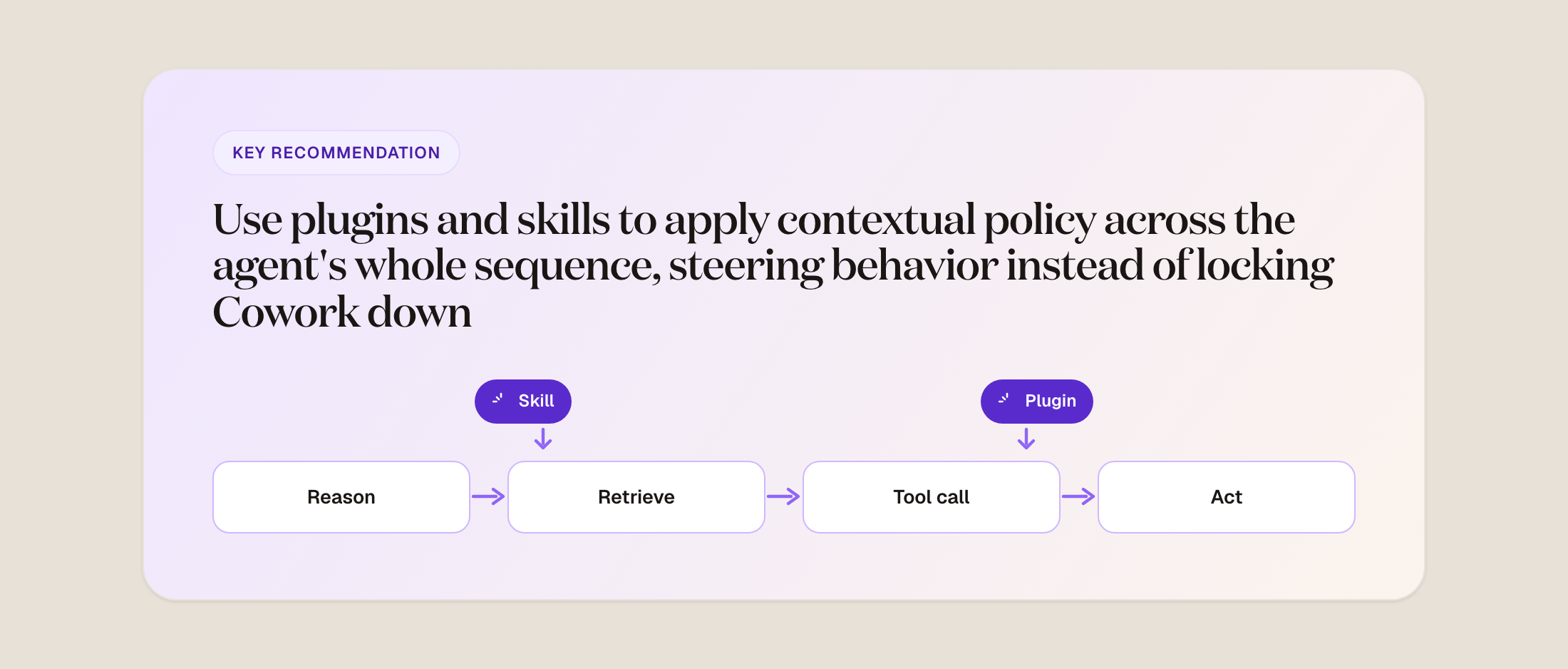
Each of these strips Cowork of something you adopted it for: the tooling it fetches, the web it searches, or the data you needed help with. You need a more flexible option, one that lets Cowork run autonomously and keeps you in control when a task goes off track. That is the role of the agent harness, applied through plugins and skills.
Cowork’s plugins and skills are a proactive part of that harness. Plugins are Cowork’s main model for hook-like control, bundling skills, connectors, and commands, which is different to other tools’ options.
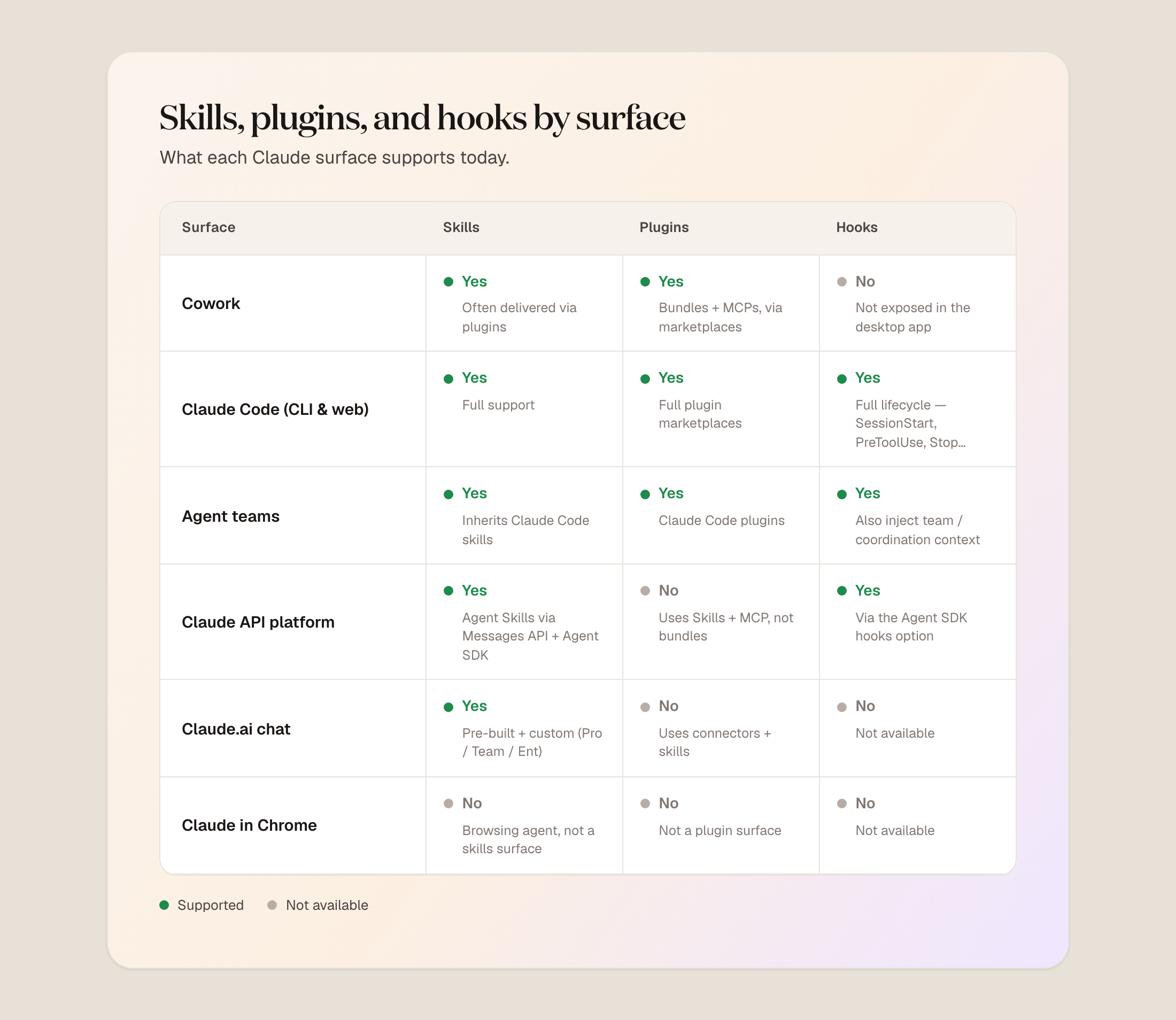
A plugin is the container you distribute and police centrally, while a skill is task know-how that can live inside a plugin or stand on its own. Skills shape behavior and are advisory, while plugins and the MCP servers they carry allow Cowork to reach into external systems.
Rather than blocking whole classes of actions, you pause a workflow when it crosses a boundary, add an approval at a critical step, or strip sensitive context before it carries forward. Plugins and skills apply that policy continuously, in real time, without stripping Cowork of what makes it useful.
This is different from putting a gateway in front of the agent. A gateway is a chokepoint: it governs only the traffic routed through it, adds latency to every governed call, requires agents to be reconfigured and maintained, and sees content at a boundary rather than the agent’s configuration, tools, and behavior.
Universal guardrails for AI agents also sound appealing but rarely work in practice.
6. Center multi-agent visibility on people, teams and workflows
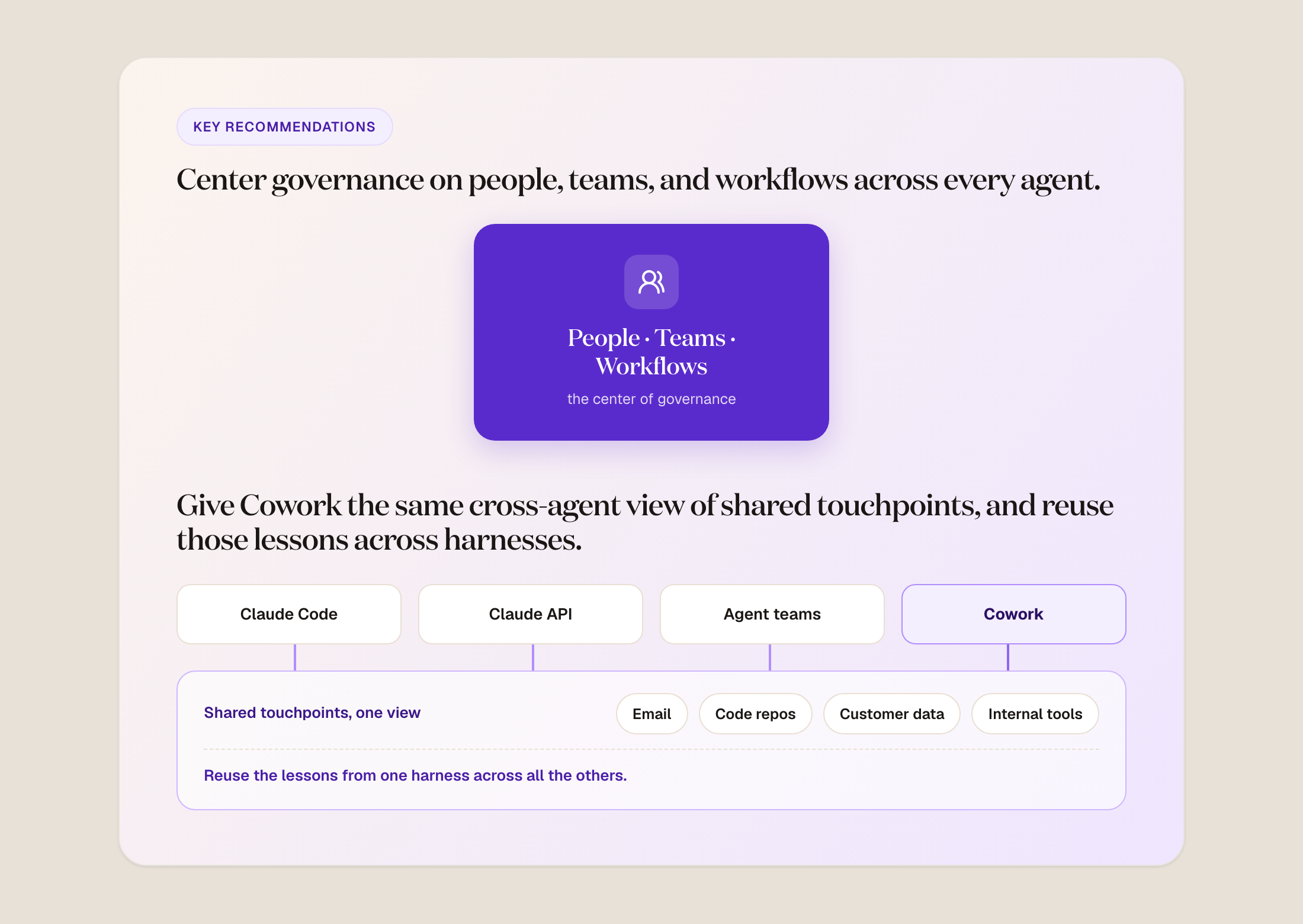
Most enterprises run several AI agents that touch the same users, tools, and data. A sustainable approach to governance of any one tool will necessarily center on people, teams, and workflows, so insights and controls can scale across multiple agents.
Even just when evaluating the risk of Cowork, there is value in seeing multi-agent, cross-vendor workflows and their shared touchpoints: the data resources, APIs, MCPs, and organizational assets that agents reach across their harnesses, because this lets learnings cross-pollinate at the key levels of people, teams, and workflows.
For example, you find the vulnerabilities that recur across harnesses, as well as which tools, MCPs, and skills to allow or deny for specific users and teams.
Governing Cowork should include that cross-agent view of shared elements, for learning and for efficiency, to get better signal over time about where risk concentrates, in the shared data, credentials, and assets that many agents reach.
It is worth mentioning that, if you do narrow to a single agentic tool, you lose the chance to learn which controls work best across those shared users, tools, and data sources.
Conclusion
Configuration takes you a long way with Cowork. You get onto a plan that carries the controls, then harden the MDM keys, connectors, and network paths before you turn it on. The steps past that are still partly Cowork’s own, like using its harness of plugins and skills to remediate issues in real time.
As we progressed through the various steps, what broadened was the meaning of that work. Once you are watching how an agent behaves across a sequence, and where risk concentrates in the shared data, credentials, and assets that many agents reach, you are asking questions that apply to every agent your teams use. Governance organized around your people, teams, and workflows is what carries those learnings from one agent to the next.
So the mechanics stay Cowork-specific, while the understanding you build by adopting Cowork safely also sets you up to take control of the uncertainty around the other agents already in use across your enterprise.
To see how Geordie secures and governs alongside Cowork’s built-in configurations, starting from personal account usage, moving into contextual visibility, securing through the harness with Beam and creating insights and controls based on shared learnings from multiple agents, book a demo with the team today.